LAMP stands for Linux (Operating System), Apache HTTP Server, MySQL (Database) and PHP. Of these components, the Operating System and HTTP services come pre-installed with your VPS package. You need to install MySQL and PHP manually.
Note:
- This has to be followed on VPS server without any control panel like Cpanel or Plesk.
- This documentation assumes that you are connected to the Server using an SSH client as a root user.
- If you have installed cPanel or Plesk, you need not follow this documentation. Such hosting panels take care of all the services and applications that are part of them. For example, cPanel auto-installs MySQL, phpMyAdmin and PHP.
To Install PHP
- Start the installation using the command:
yum install php - Follow the onscreen instructions and reply by typing y, when prompted.
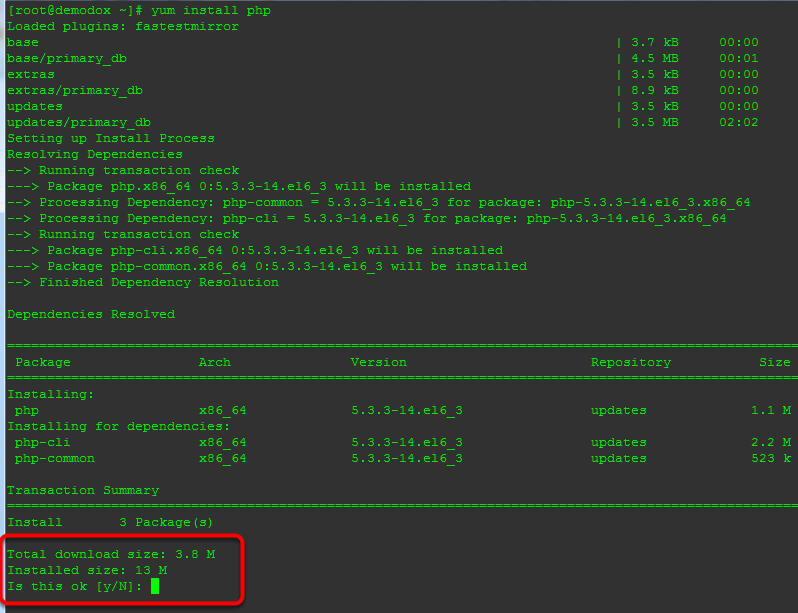 Note If you want such prompts to be auto-answered as yes, specify -y in the installation command. For example, yum -y install php.
 - This completes the installation of PHP.

To Install MySQL
Proceed with the installation using the command below. This installs MySQL server along with MySQLi.
yum install mysql-server mysql php-mysql
To Start the Services
For the configuration changes to take effect, the services need to be started/restarted. Start the MySQL service using the command:
service mysqld start
PHP runs on Apache and you would thus need to restart the httpd service using the command:
service httpd restart
To Auto-Start the Services
Its a good practice to setup important services on your Server as Auto-Start. This ensures that such services start automatically every time your VPS is started or rebooted. Run the commands below to auto-start Apache and MySQL services:
chkconfig httpd on chkconfig mysqld on
You can now run web applications or your website(s) that require the LAMP stack.
