Transferring your domain to StormerHost from another domain provider allows you to manage your domain with stormerhost. The process is standard across most registrars and typically takes up to 6 days to complete.
This guide explains the full transfer process step by step.
Before You Begin (Important Requirements)
Before starting a domain transfer, ensure the following:
- The domain is at least 60 days old
- The domain has not been transferred within the last 60 days
- You have access to the registrant email address
- The domain is unlocked at the current registrar
- You can obtain the EPP/Authorization Code
Step 1: Unlock the Domain at the Current Registrar
Domain locking is a standard security feature applied by registrars to protect your domain from unauthorized transfers. When a domain is locked, it cannot be moved to another provider, even if a transfer is requested.
Before initiating a transfer to StormerHost, you must unlock the domain at your current registrar.
To do this:
- Log in to your current domain provider (such as Hostinger or Namecheap).
- Go to the Domain Management or My Domains section.
- Select the domain you want to transfer.
- Locate the Domain Lock or Transfer Lock setting.
- Disable the lock and save the changes.
Once unlocked, the domain becomes eligible for transfer. If this step is skipped, the transfer request will be automatically rejected by the current registrar as a security measure.
Note: Some registrars may take a short time (a few minutes up to an hour) to fully apply the unlock status.
Step 2: Obtain the EPP (Authorization) Code
The EPP code (also called the Authorization Code or Transfer Code) is a unique, registrar-generated security key assigned to your domain. It serves as proof that you are the legitimate owner and are authorizing the transfer.
This code is required by StormerHost to initiate the domain transfer process.
To obtain the EPP code:
- In the domain management area of your current registrar, look for an option such as “Get EPP Code” or “Authorization Code.”
- Request the code.
- The registrar will either:
- Display the code directly in your dashboard, or
- Send it to the domain’s registered contact email address.
Important: The EPP code is sensitive information. Do not share it publicly or with unauthorized parties, as it can be used to transfer your domain without further approval.
Step 4: Initiate the Transfer at StormerHost
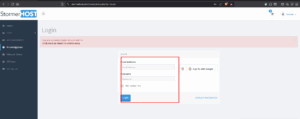
Log in to your StormerHost client area
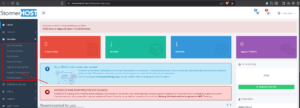
Go to Domains → Transfer Domain to Us
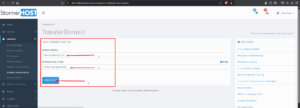
Enter the domain name and Provide the EPP / Authorization Code
Complete the checkout process
A domain transfer usually takes 6 days to fully complete; please wait while the transfer is in progress and reach out to your support line when the transfer days are completed.
