Redirecting a domain allows you to automatically send visitors from one domain name to another. This is useful when you’ve changed your website’s primary address, want to consolidate traffic from multiple domains, or temporarily forward visitors during maintenance.
At StormerHost Ghana, you can easily set up domain redirects through your cPanel account. Whether you’re forwarding a parked domain or redirecting to another website entirely, cPanel provides a simple interface to manage permanent (301) and temporary (302) redirects.
This guide walks you through the steps to create, manage, and remove domain redirects using your StormerHost hosting account.
- Log in to cPanel. Visit yourdomain.com/cpanel or go through your hosting dashboard (e.g., StormerHost). Enter your username and password.
- Go to the “Redirects” Tool. Under the Domains section, click on Redirects.
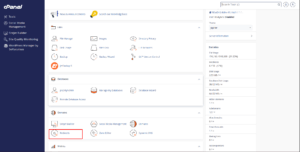
cPanel 3. Choose the Redirect Type In the Type dropdown
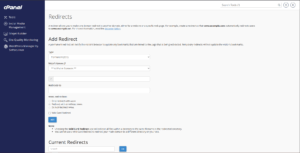
Redirect setup Permanent (301): Tells search engines the redirect is permanent (recommended for SEO).
Temporary (302): Redirect is not permanent and won’t affect SEO.
- Set the Domain to redirect.
In the next dropdown, select the domain name you want to redirect. Optionally, you can enter a specific folder or page (e.g., /blog) to redirect just that path. - Enter the Destination URL
In the “Redirects to” field, enter the full URL you want to send visitors to. Example: https://newdomain.com or https://yourdomain.com/newpage - Choose Redirect Options
Only redirect with www – Redirects only if the visitor includes “www”.Redirect with or without www—recommended setting; works in all cases.Do Not Redirect www— Only works for non-www access. - Click “Add.”
Once everything is set, click the “Add” button to create the redirect.
Testing Your Redirect After Setting It Up:
Open a browser and go to the original domain or path.
It should automatically redirect to the new destination URL.
If it doesn’t, try clearing your browser cache or wait a few minutes for the server to apply changes.
